
TL;DR
- 個人学習として、Cloud Monitoring でエラー検知時に Slack 通知する仕組みを Terraform で構築
- 知見のメモとして公開
- AWS や Azure でも概ね同様の流れで構築可能だが未検証
Terraform での実装
まずは、以下の Terraform リソース構成を用意します。
なお、記述内容については Slack の設定に関するものだけを掲載します。
❯ tree
.
├── main.tf
├── modules
│   └── monitoring
│       ├── main.tf
│       ├── outputs.tf
│       └── variables.tf
├── outputs.tf
├── providers.tf
├── terraform.tfvars
├── variables.tf
└── versions.tf
./modules/monitoring の実装
modules 配下の実装は以下のようにしました。
./modules/monitoring/main.tf
###########################################################
# Cloud Monitoring
###########################################################

# Cloud Monitoring API 有効化
resource "google_project_service" "monitoring" {
  project = var.project_id
  service = "monitoring.googleapis.com"
}

# HTTPSアップタイム監視と通知
resource "google_monitoring_uptime_check_config" "https" {
  display_name = "Wiki HTTPS 稼働時間チェック"
  timeout      = "10s"
  period       = "300s"

  # HTTPチェックの設定
  http_check {
    path         = "/"
    port         = 443
    use_ssl      = true
    validate_ssl = true
  }

  # 監視対象のリソース設定
  monitored_resource {
    type   = "uptime_url"
    labels = { host = var.host }
  }

  # 依存関係の設定
  depends_on = [google_project_service.monitoring]
}

# Slack通知チャネルの作成
resource "google_monitoring_notification_channel" "slack" {
  display_name = "Slack - Wiki Alerts"
  type         = "slack"
  # Slack通知チャネルの設定
  labels = {
    channel_name = var.slack_channel
  }
  # Slack通知チャネルの認証トークン
  sensitive_labels {
    auth_token = var.slack_token
  }
  # 依存関係の設定
  depends_on = [google_project_service.monitoring]
}

# アラートポリシーの作成
resource "google_monitoring_alert_policy" "uptime_down" {
  display_name = "Wiki HTTPS Uptime Down Alert"
  # どれか1つでも condition が true ならアラート発火
  combiner = "OR"
  # 通知チャネルの設定
  notification_channels = [google_monitoring_notification_channel.slack.id]

  # アラート条件の定義
  conditions {
    display_name = "Uptime Check Failed"
    # Uptimeチェックが失敗した場合にアラートを発火
    condition_threshold {
      # フィルターの設定(メトリックタイプとチェックID)
      filter = "resource.type=\"uptime_url\" AND metric.type=\"monitoring.googleapis.com/uptime_check/check_passed\" AND metric.label.\"check_id\"=\"${google_monitoring_uptime_check_config.https.uptime_check_id}\""
      # 比較演算子の設定
      comparison = "COMPARISON_LT"
      # 閾値の設定
      threshold_value = 1
      # 評価期間の設定
      duration = "300s"
      # トリガー条件の設定
      trigger {
        count = 1
      }
      # アラート発火のトリガー条件を設定
      aggregations {
        # 集計期間の設定
        alignment_period = "60s"
        # シリーズごとのアライナーの設定
        per_series_aligner = "ALIGN_NEXT_OLDER"
      }
    }
  }
  # 依存関係の設定
  depends_on = [google_monitoring_uptime_check_config.https]
}

# Scheduler 失敗アラートポリシーの作成
resource "google_monitoring_alert_policy" "scheduler_failed" {
  display_name          = "Scheduler Job Failed Alert"
  combiner              = "OR"
  notification_channels = [google_monitoring_notification_channel.slack.id]

  # 通知のレート制限設定
  alert_strategy {
    notification_rate_limit {
      period = "300s"
    }
  }

  # アラート条件の定義
  conditions {
    display_name = "Cloud Scheduler error logs"
    # ログベースの条件を使用して、Cloud Schedulerのエラーログを監視
    condition_matched_log {
      filter = "resource.type=\"cloud_scheduler_job\" AND resource.labels.job_id=~\"gce-(stop-nightly|start-morning)\" AND severity>=ERROR"
    }
  }
  # 依存関係の設定
  depends_on = [google_project_service.monitoring]
}
./modules/monitoring/variables.tf
##################################
# 入力変数
##################################
# Google Cloud プロジェクトID
variable "project_id" {
  description = "Google Cloud プロジェクトID"
  type        = string
}

# Uptime監視対象のホスト名またはIP
variable "host" {
  description = "Uptime監視対象のホスト名またはIP"
  type        = string
}

# Uptime監視対象のDNS名またはIPアドレス
variable "dns_name" {
  description = "監視対象のDNS名またはIPアドレス"
  type        = string
}

# TechSnapのSlackチャンネル
variable "slack_channel" {
  description = "TechSnap Alert Management Slack channel"
  type        = string
}

# TechSnapのSlackトークン
variable "slack_token" {
  description = "通知を監視するためのTechSnap Slackトークン"
  type        = string
}
./modules/monitoring/outputs.tf
##################################
# 監視モジュールの出力
##################################

# Cloud プロジェクトID(参照用)
output "project_id" {
  value = var.project_id
}

# 監視対象のDNS名またはIPアドレス(参照用)
output "dns_name" {
  value = var.dns_name
}
infra ルート配下での実装
infra ルート配下での実装は以下のようにしました。
(Slack の定義に関わる箇所のみ)
./main.tf
############################################################
# Monitoring
############################################################
# モニタリングモジュールの呼び出し
module "monitoring" {
  source        = "./modules/monitoring"
  project_id    = var.project_id
  dns_name      = "${var.subdomain}.${var.domain}"
  host          = var.enable_public_dns ? "${var.subdomain}.${var.domain}" : google_compute_address.sample_ip.address
  slack_channel = var.slack_channel
  slack_token   = var.slack_token
}
./variables.tf
# Slackトークン
variable "slack_token" {
  description = "通知を監視するための Slackトークン"
  type        = string
  sensitive   = true
}

# Slackチャンネル
variable "slack_channel" {
  description = "通知を監視するための Slackチャンネル"
  type        = string
  sensitive   = true
}
Slack での設定方法
(参考)
cloud.google.com
cloud.google.com/monitoring/support/notification-options?hl=ja
1. Slack 側の準備
- Slack ワークスペースおよび通知用チャンネルをあらかじめ作成しておきます。
- そのチャンネルの URL をメモしておきます。
- (チャンネルがプライベートの場合)通知を受けるために、Monitoring アプリをそのチャンネルに招待する必要があります。具体的にはチャンネル内で
/invite @Google Cloud Monitoringを送るなど。 - Slack 側で特別な “Incoming Webhook” を作る方法を使うケースもありますが、Cloud Monitoring 公式ドキュメントでは「Slack 統合」を使った手順が案内されています。
2. Slack API での準備
api.slack.com
api.slack.com/apps
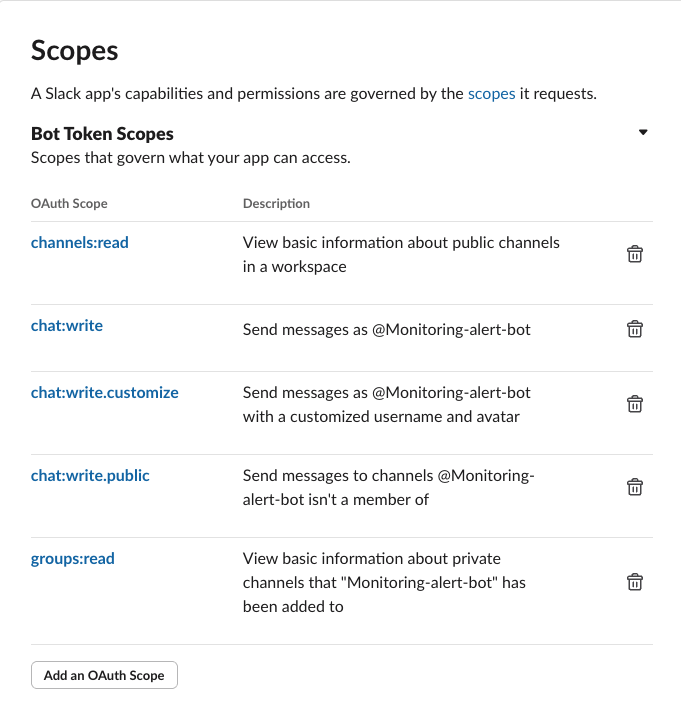
Slack API へアクセスし、Slack 側でアラート通知するための bot を作成します。
ハマりポイント
Terraform で実装した後に terraform apply コマンドでデプロイした際に、Slack へ疎通が通らず apply に失敗しました。
失敗前に Scopes で設定した内容は以下の通りです。
- chat:write
- chat:write.customize
実際は以下の設定が不足していたことにより apply に失敗してしまいました。
- channels:read
- groups:read
補足: Cloud Monitoring の Slack 連携は、ワークスペースに「Google Cloud Monitoring」公式アプリを追加してトークンを取得する方法もあります。この記事ではカスタム Slack App(Bot)を使う前提で整理しています。
OAuth Tokens でトークンを控える
.tfvars に、Slack のチャンネル名と OAuth トークンを記載します。
(機微情報のため .gitignore でコミット対象から除外することを推奨)
slack_channel        = "sample-alert-management"
slack_token          = "xoxb-xxxx-xxxx-xxxx"
Slack のチャンネル名には先頭の “#” を含めません。
("#" を含めると解決先が見つからず疎通に失敗します)
Slack 側の対応
Slack API で作成した bot を、通知させたい Slack チャンネルに招待します。
Google Cloud 側での確認
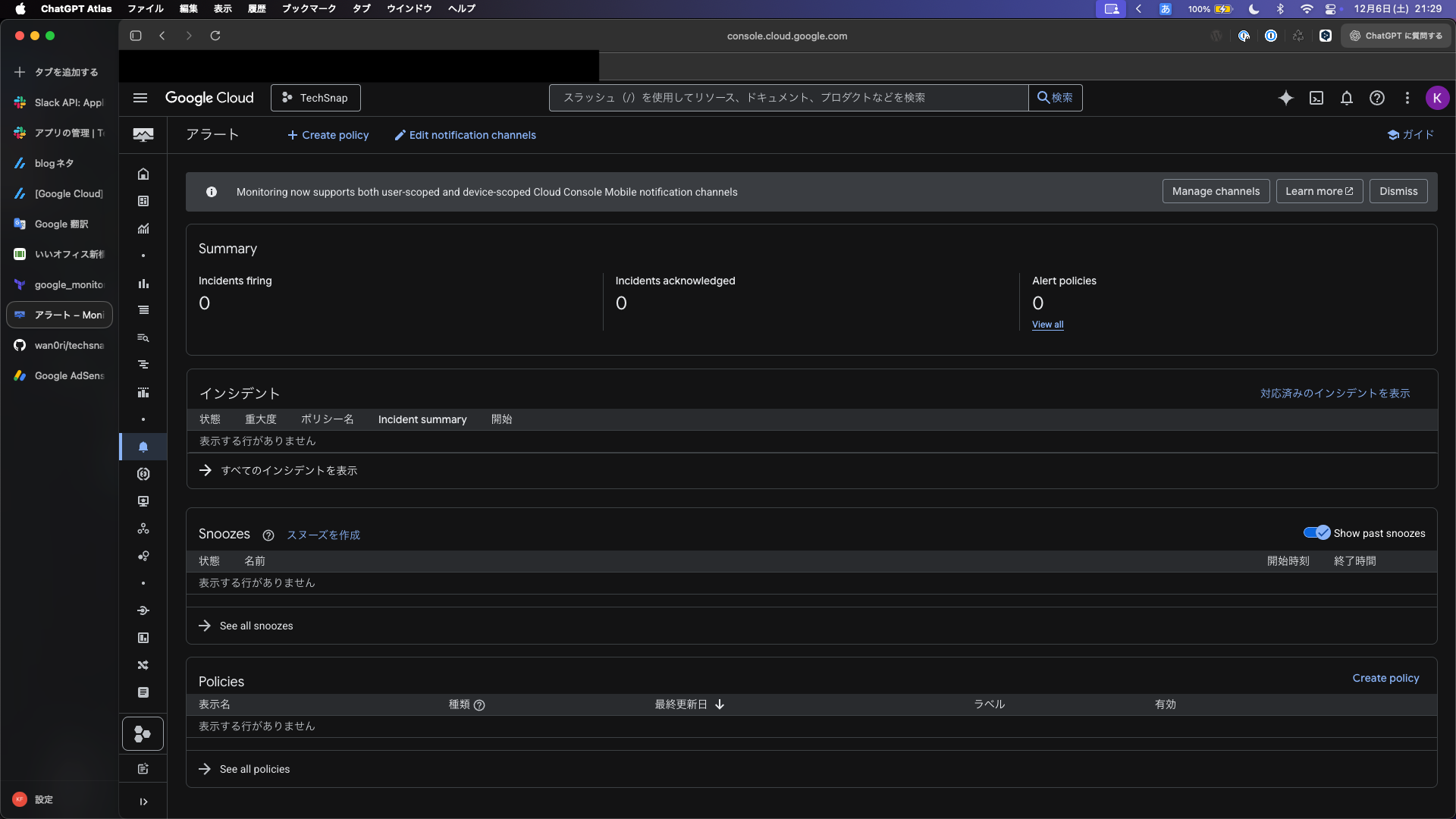
before
作業前のコンソールは以下のように Alert policies が 0 になっています。
after
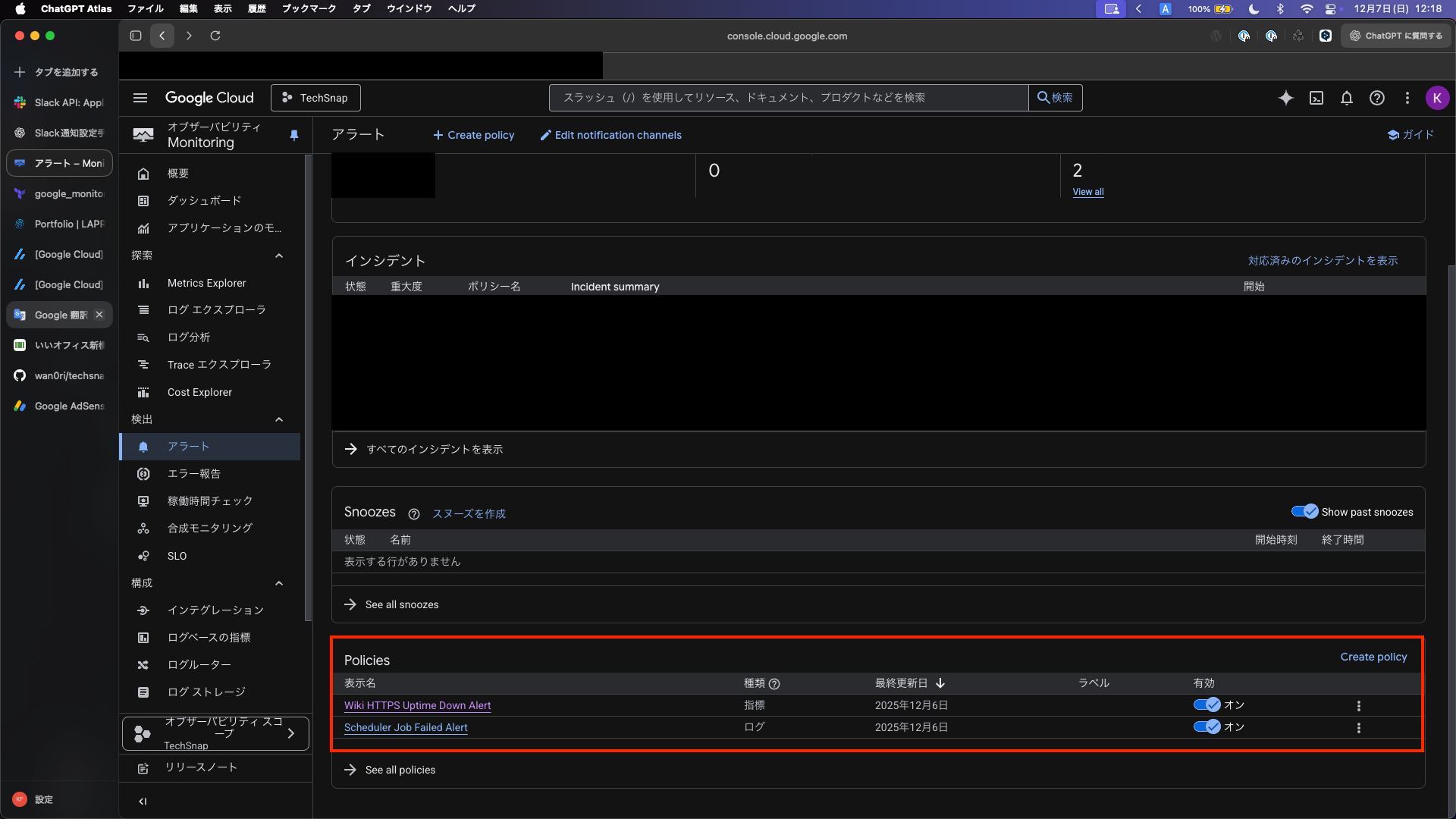
terraform apply 実行に成功すると、コンソールが以下のように変化します。
- 通知チャネルの確認を実施し、Slack が追加されることを確認する
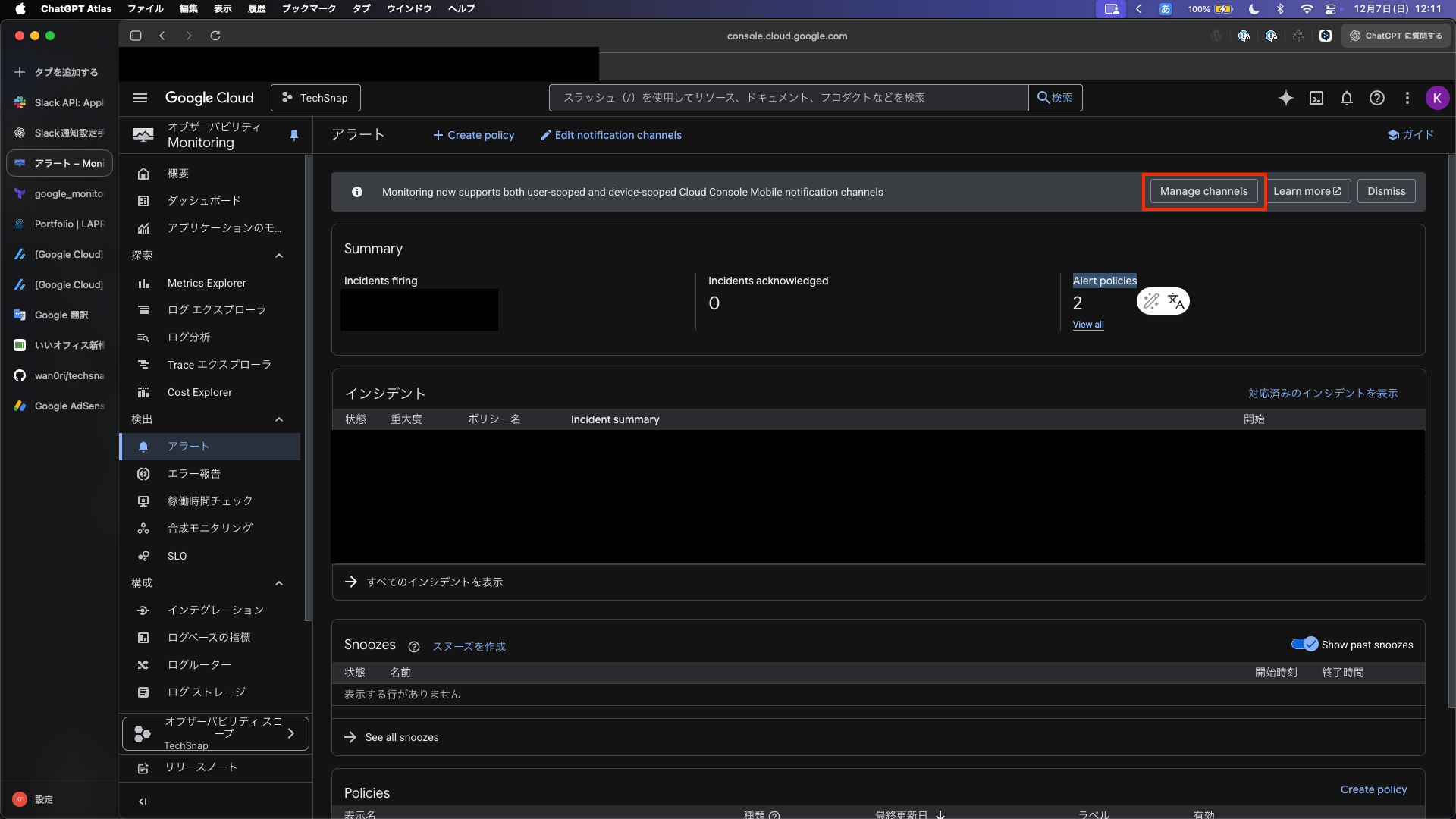
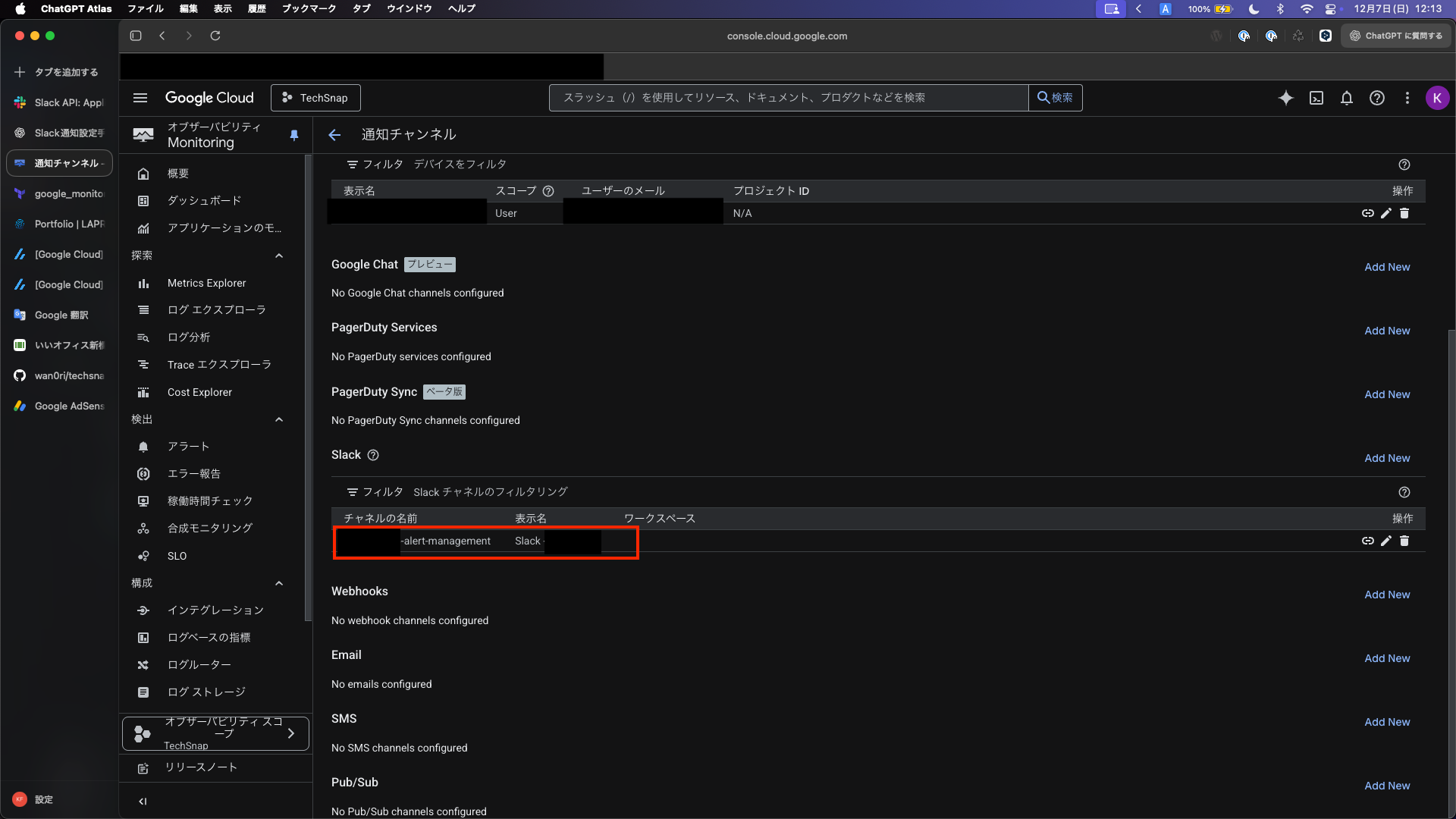
- ポリシーに Terraform で定義されたポリシーが追加されたことを確認する
まとめ
- Terraform で Cloud Monitoring の API 有効化、Uptime チェック、Slack 通知チャネル、アラートポリシーまでをコード化して再現可能にした
- Slack 連携は「チャンネル名に # を含めない」「必要スコープに channels:read / groups:read を追加」「Bot を通知先チャンネルへ招待」の 3 点が落とし穴
.tfvarsにトークンを置く場合は機微情報の管理とsensitiveの活用、コミット除外を徹底するterraform apply後は Monitoring の通知チャネルとアラートポリシーが作成されていることをコンソールで確認する- 他クラウドでも概念は共通だが未検証。次はアラート条件の最適化と障害演習で通知動作を実地確認する